Key validator contract
The rc.17 access screen places a credential well after the input and before the Verify action. The Get key and Cancel actions remain secondary 44 px controls. Automatic card heights remain 332 px without Discord/GetKey, 394 px with Discord only, 404 px with GetKey only, and 462 px with both. The logo can show the player’s avatar withLogo = "Avatar", or use Logo = false and MarkText.
UI:CreateKeySystem(options) requires Validate(key). The validator can yield and must return true, result for acceptance or false, message for rejection. gate:Submit(key) starts validation asynchronously. Raw validator exceptions and submitted keys are not shown in the gate’s generic error status.
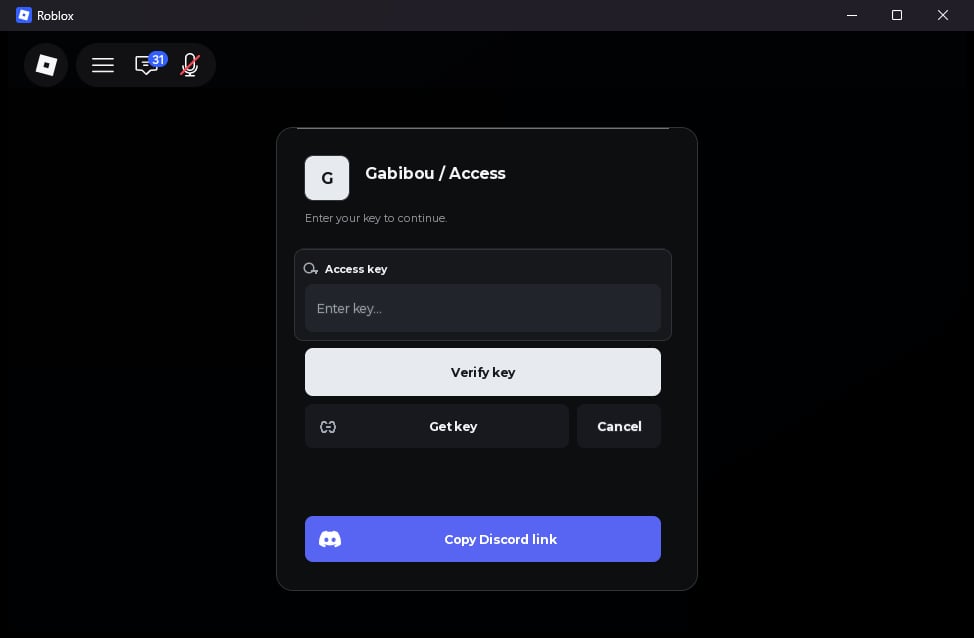
Logo = "Avatar". Set Logo = false to show MarkText, or pass an uploaded image URI such as rbxassetid://123456. gate:GetParts() exposes MarkImage and MarkText for the logo and CredentialWell for the inset background behind the access-key input. Style CredentialWell directly. The submit button defaults to Verify key.
Named key-gate parts use responsive layout by default. gate:SetPartLayout(name, options) stores a Position, Size, AnchorPoint, or Visible override across reflow and updates; gate:ResetPartLayout(name) restores automatic placement. The fixed Overlay and Card cannot be moved this way. See the Design guide for a short Get key button example.
The default width is 420 px (280–600). Automatic heights are 332 px without Discord or GetKey, 394 px with Discord only, 404 px with GetKey only, and 462 px with both. Height accepts 280–560 px. When the height is automatic, adding or removing Discord/GetKey recalculates it; an explicitly supplied height remains fixed during updates. The layout gives the Verify action a full-width row when GetKey is present, followed by Get key and Cancel actions.
BackgroundTransparency controls the full-screen dimmer and defaults to 0.42. CardTransparency controls only the key dialog surface and defaults to 0.1. Both accept values from 0 (opaque) to 1 (transparent); change them with gate:Update({...}).
Choose action labels
Use short labels when possible. In rc.20, a label that does not fit its button shows an ending ellipsis; its configured string remains unchanged.SubmitText and CancelText may be up to 32 characters, while GetKey.Text and Discord.Text may be up to 48:
UI:CreateKeySystem({...}) options table, including its required Validate callback. Label truncation is visual; it adds no API or font-scaling setting.
Get a key
GetKey is disabled when omitted or set to false. A URL string or {Url, Text, Copy} table adds a button that attempts to copy a provider link. URLs must be HTTPS, include a host, contain no whitespace or control characters, and be at most 2048 bytes. Text defaults to Get key and is limited to 48 characters. The optional Copy(url) callback can provide clipboard support. If copying is unavailable, fails, or returns false, the gate shows the URL in a selectable field for manual copying. The UI never opens the link automatically.
GetKey = function(gate) ... end. Call gate:GetKey() to run it; this returns a success boolean and optional reason. The action is single-flight. Update/destroy invalidates any stale result from a yielding action. gate:Update({GetKey = false}) removes the button. GetParts() exposes GetKeyButton, KeyLink, and KeyLinkStatus.
When a window already exists in the same scope, a custom action can use it to show the provider instructions:
demo, in a notification. That callback is only a local preview; it does not replace server validation.
Discord invite button
Discord can be an invite URL string or a table with Url, Text, CopiedText, Color, optional image Logo, and optional Copy(url) callback. Supported invite forms are https://discord.gg/<code> and https://discord.com/invite/<code>. The UI does not call Discord or check whether an invite is active.
Discord = false to remove the button. gate:CopyDiscordLink() returns a boolean and an optional reason. Without a working clipboard function, the dialog shows a selectable link for manual copying. gate:Update({Discord = false}) removes Discord while the gate is idle and open. GetParts() exposes the Discord button, icon, selectable link, and status label.
Gate lifecycle and options
gate:Cancel() cancels the current attempt but leaves the dialog open. gate:Destroy() closes it and silences future callbacks. gate:Update(options) validates and applies partial options while key validation is not running; it refuses updates during validation or after completion/destruction. An update may invalidate a pending GetKey action and suppress its stale result.
Key dialog text defaults include Title = "Access key", Subtitle = "Enter your key to continue.", Placeholder = "Enter key…", InputLabel = "Access key", SubmitText = "Verify key", ValidatingText = "Verifying…", CancelledText = "Cancelled", and MarkText = "G". MaxLength defaults to 256 and accepts 1–4096. See API reference for the rest of the gate options.
Use Launch for startup
UI:Launch(spec) combines declarative window creation with KeySystem, Loading, sequential Steps, and lifecycle callbacks. The gate appears first. On success the library runs each setup step, then builds the window.
Status, LastError, Gate, Loader, Window, Cancel(), and Destroy(). Cancel() calls OnCancel once. Destroy() releases resources without calling that callback. Status values are WaitingForKey, Loading, Ready, Failed, and Destroyed.
See Discord key example and server validation example.