Notifications
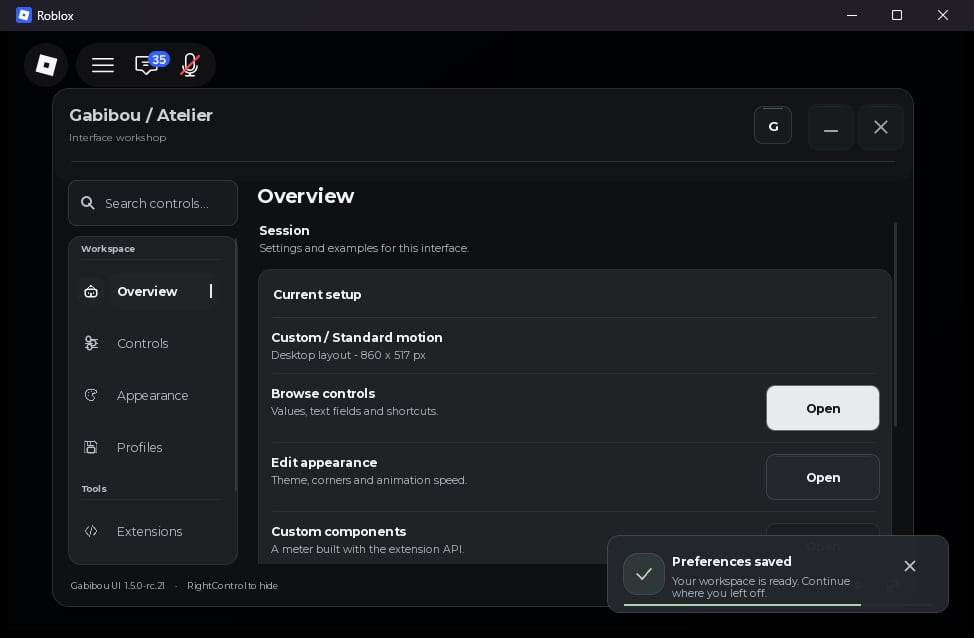
window:Notify({Title, Content, Kind, Icon, Duration}) displays a notification and returns a toast with Dismiss() and Destroy() methods.
In rc.18, notification cards adapt to narrow or short viewports: the card and close button fit the available space, while the icon badge, body text, and progress bar hide when there is not enough room. This fallback is automatic and adds no option. The configured Width remains 220–600 px; the rendered card may be narrower when the viewport cannot fit that width. Desktop geometry is unchanged when at least 220 px is available.
In rc.17, notifications use a 40 px state badge, 16 px outer insets, and a 44 px dismiss target. The layout has no vertical accent stripe; its card edge uses the neutral theme border.
info, success, warning, and error. Default icon/token pairs are info/Accent, check/Success, bell/Accent, and close/Danger. Title accepts up to 80 characters; Content accepts up to 1200.
UI:SetNotifications(options), or update a window with window:SetNotifications(options). Defaults are Position = "BottomRight", Width = 340, Margin = 18, Gap = 10, MaxVisible = 4, Duration = 4, ShowProgress = true, and AnimationDuration = 0.18. Position accepts TopRight, BottomRight, TopLeft, or BottomLeft. See API reference for valid ranges.
Confirmation dialog
window:Confirm({Title, Content, ConfirmText, Callback}) opens a confirmation dialog. It returns false when a confirmation modal is already open; otherwise it returns true. Callback runs only after the user confirms and receives true; cancelling or closing the dialog does not call it.
Discord community prompt
DiscordPrompt is an opt-in root window option. When present on UI:CreateWindow(options) or the root of UI:Launch(spec), the invite prompt appears after the window is created. Omit it to keep the prompt disabled. You can also open it on demand with window:PromptDiscord(urlOrOptions); it returns true when the modal opens or false, reason otherwise.
Open(url) or Copy(url) callback runs only when the user selects the corresponding action; returning false or throwing leaves the prompt open with a selectable link. Without a clipboard callback, the invite remains available to copy manually. The fixed Gabibou UI · by Gabibou credit stays visible in the prompt even when the window watermark is hidden. See Discord prompt examples for extended text and repeat options.