Choose an integration
UI:Create({Loading = true})shows the default loader while declarative tabs and controls are built.UI:Create({Loading = {...}})uses loader options for schema-build progress.UI:CreateLoader(options)creates a standalone loader for application work you control.UI:Launch(spec)coordinates optional key validation, sequential steps, the loader, and the final window.
Create loader reports controls constructed. Use a standalone loader or Launch steps to report data loading or other work. A displayed percentage represents only the progress your code reports.
In rc.16, the loader card and text use a 0.2-second entrance. Its entrance settles before Update(options) changes the loader or completion runs; progress updates can occur during the entrance. Reduced motion skips the entrance transition.
Presets and options
Variant accepts Compact, Centered, or Minimal. Compact is the default and uses a 216 px default height. Centered defaults to 300 px; it centers the logo and title and falls back to compact below 260 px of available card height. Minimal uses compact layout without the logo. Height may be set explicitly from 160 to 480 px.
Other options include:
Other options are
Theme, Style, Position, AnchorPoint, Parent, DisplayOrder, ReducedMotion, OnComplete(loader), and OnError(loader, title, index). The window’s parent, theme, style, and reduced-motion setting are inherited by the integrated loader when omitted. Update can change either transparency independently.
Give the loader room to breathe
Width and Height set the card’s outer size, Padding sets space inside its edges, and LogoSize sets the avatar or image size. Start with a centered card, then adjust those values to fit your title and status text:
Minimal when the title and progress status are enough; it uses the compact layout without a logo.
In rc.19, a crowded Centered card automatically hides its logo if the logo, padding, and visible title/subtitle would leave less than 12 px before the status area. The text remains centered, and no option or default layout changes.
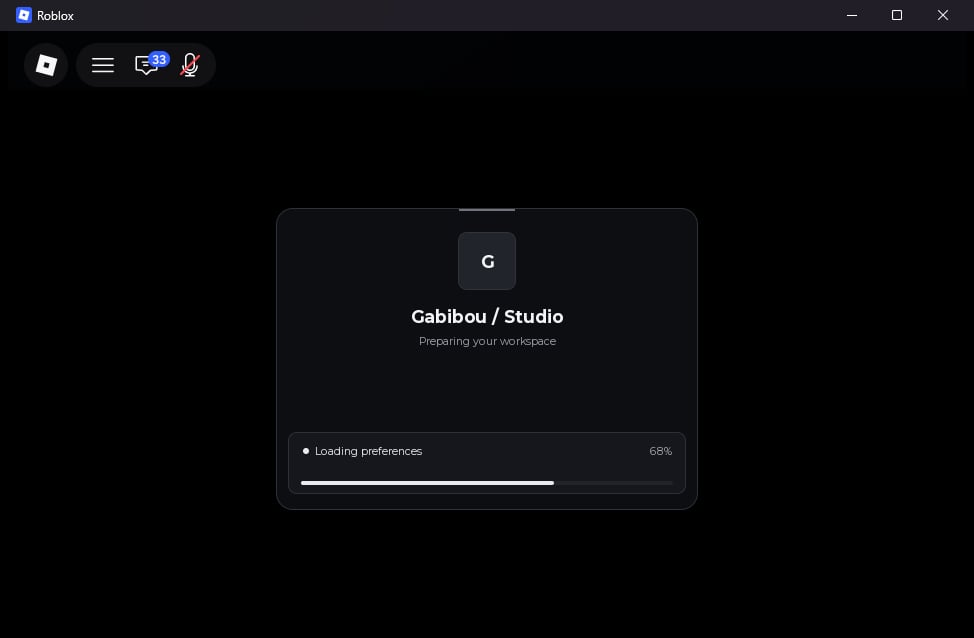
Report progress
SetProgress(ratio, status) accepts a ratio from 0 to 1 and optional status text. SetStatus(text) changes the status independently. Complete(status) sets progress to 100%, honors the remaining minimum display time, plays the exit transition, destroys the loader, then calls OnComplete. Destroy() cancels it without calling OnComplete.
Update(options) merges a partial table with the current options and validates before applying it. The current height is preserved when only the variant changes. To change a default compact loader to centered, update both values:
loader:Run(steps) accepts a nonempty dense array of {Title, Run} entries. Each step runs sequentially and may yield. Progress advances after a step returns successfully. A failure stops the sequence, leaves the loader open, sets a generic LastError, and calls OnError(loader, title, index) when supplied. Call Run only once at a time.
Compose a custom loading screen
loader:GetParts() returns Overlay, Card, Logo, LogoImage, LogoText, Title, Subtitle, StatusPanel, Status, StatusIndicator, Percentage, Track, Fill, Activity, and Content. StatusPanel is the framed status area; Content is a free frame between the heading and status area.
SetPartLayout and ResetPartLayout support Logo, Title, Subtitle, StatusPanel, Status, StatusIndicator, Percentage, Track, and Content. SetPartLayout accepts finite UDim2 Position/Size, Vector2 AnchorPoint from 0 to 1, and boolean Visible. Responsive layout reapplies these overrides on resize. Use loader:Own(resource) to release custom connections, tweens, or callbacks when the loader closes. There is no opaque custom-renderer callback; create custom content under Content.
See the loading example for a complete Run(steps) flow.